
You can reply to emails using Outlook 2019 instead of cPanel Webmail.
1. Open Outlook 2019.

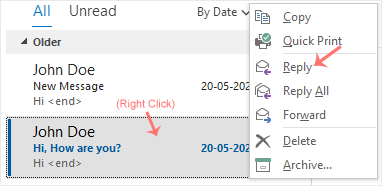
2. Right-click the email you want to reply to and select Reply.
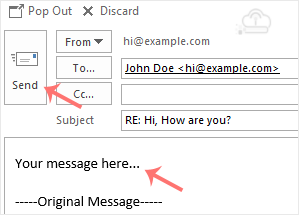
3. On the right side, the response box will open. Enter your message and click Send.
Search, register, and transfer domains with easy setup and tools that connect to your full online presence.
Launch with performance, flexibility, and room to scale.
Keep your site safer, more resilient, and easier to recover.
Explore tools and services that help you build, improve visibility, and scale smarter.
Choose the email and productivity stack that fits your workflow and growth goals.
Access support resources, educational content, and platform updates.
You can reply to emails using Outlook 2019 instead of cPanel Webmail.
1. Open Outlook 2019.
2. Right-click the email you want to reply to and select Reply.
3. On the right side, the response box will open. Enter your message and click Send.

We use essential cookies to keep this website secure and functional. Cookie Policy.
Choose which categories of cookies and similar technologies we may use. Essential cookies are always active because they are required for security, core functionality, and basic site operations.
Required for core site functionality, security, forms, and session handling.
Help us understand site usage, page performance, and visitor behavior.
Used for campaign attribution, remarketing, embedded promotional tools, or ad-related measurement.